FROM
7% TO
THE MOON

A ground-up redesign of ALTR's onboarding experience that took activation from 7% to over 50% by eliminating the friction standing between new users and their first value moment.
Project Details
Company
ALTR — Enterprise data security platform
Role
Lead Product Designer
Scope
Owned onboarding in close partnership with product and engineering
Business Model
B2B SaaS serving enterprise data teams
Primary Focus
Activation, value discovery, and scalable self-serve growth
tl;dr
ALTR's activation stalled at 7%, constraining scalable revenue growth despite strong technical capability. I identified onboarding as the primary revenue bottleneck and re-architected it around guided value discovery rather than configuration and documentation. Activation increased to 50%+, unlocking scalable self-serve growth and supporting ARR expansion from $100K to over $1M within two years.
The Problem
Companies with data governance needs had to jump through 13 steps across 3 different products just to connect their first database. The complexity was invisible to the product team until Pendo revealed that only 7% of users successfully completed onboarding on their first attempt — and over 90% abandoned after two failed tries.
The Opportunity
Behavioral analytics and direct user observation revealed that the core problem wasn't the technology — it was the lack of guidance, progress transparency, and a single source of truth. Users were context-switching between ALTR, Snowflake, and documentation, losing their place every time.
The Results
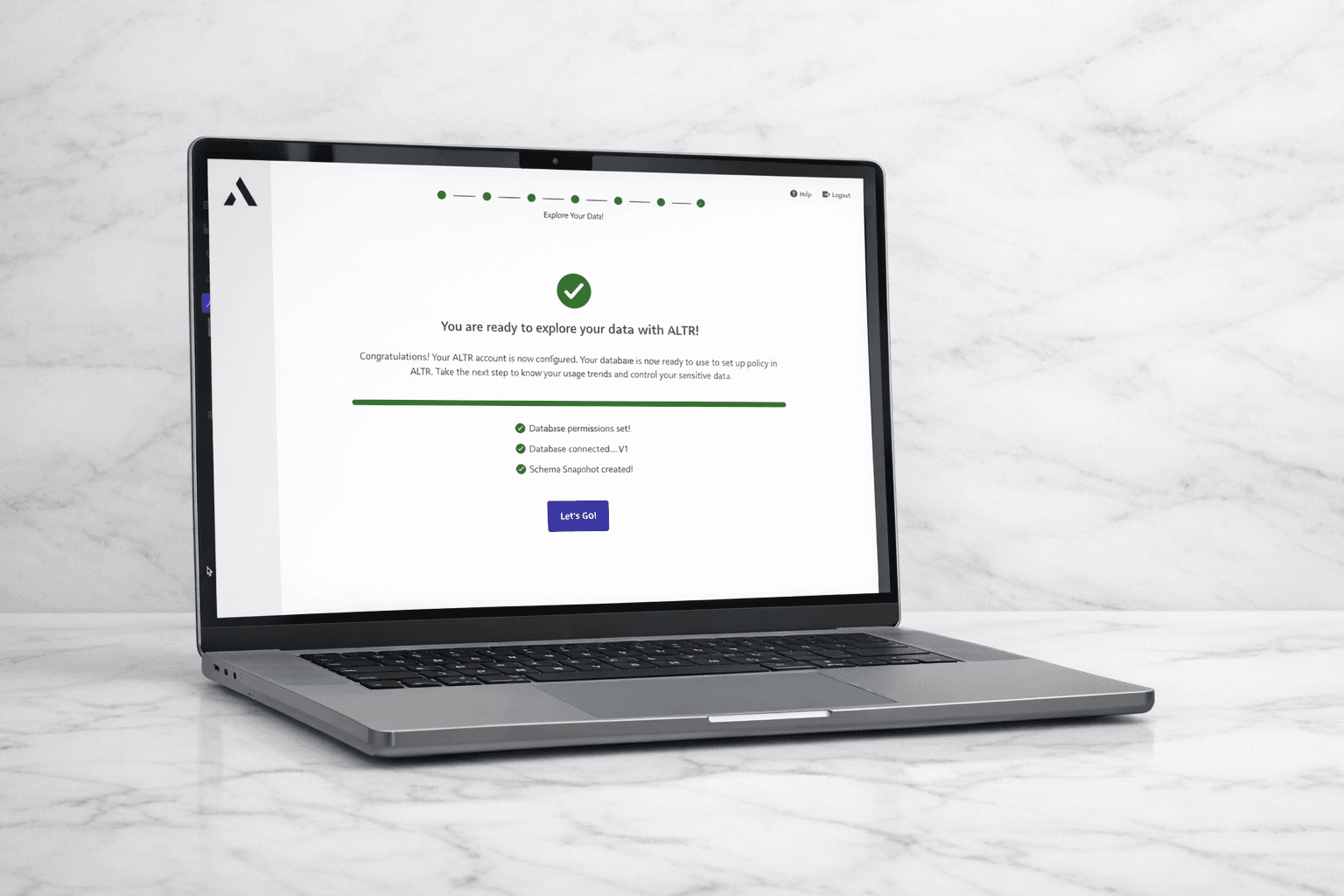
Designed and shipped a guided onboarding wizard that:
- •Reduced activation steps from 13 to 7 across 2 touch points (down from 3).
- •Took activation rate from 7% to over 50%.
- •Grew daily active users by 80% within two months of launch.
7%→50%+
Activation Rate
80%
DAU Increase in 2 Months
13→7
Steps to Activate
A product built for power users, marketed to everyone
ALTR had landed a handful of enterprise contracts, but leadership saw an opportunity to scale beyond the high-touch sales motion and pivoted to a product-led growth model, investing in paid marketing and betting that users could discover value independently. Traffic increased, but database connections didn't move. The product was built for power users who knew exactly what they were doing, not for someone arriving from a marketing page trying to understand what ALTR could do for them. That gap between the growth model leadership committed to and the first-timer experience the product actually delivered is what prompted my exploration with Pendo.
From quantitative signals to qualitative insight to a validated redesign
The project began with a data signal no one could ignore: 7% activation. From there, I used Pendo to map exactly where users were failing, then brought them in for direct observation to understand why. That combination of behavioral data and qualitative insight shaped everything that followed.
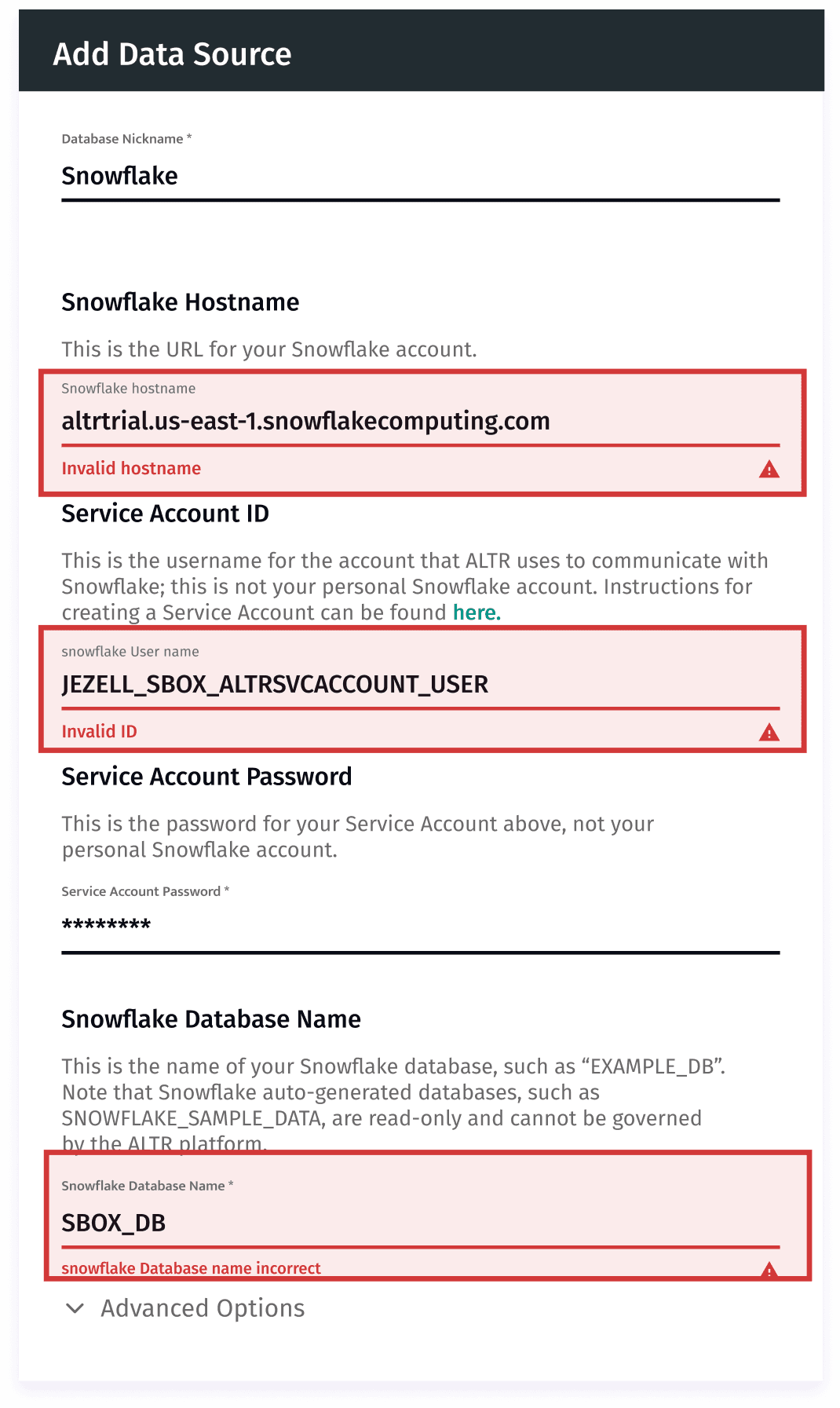
Discovered the activation gap using Pendo behavioral analytics — making the invisible problem visible.
- •Queried user session data to find exactly where users were dropping off in the onboarding flow.
- •Identified the 'Add Data Source' form as the primary failure point — not lack of intent.
- •Surfaced that the form error rate and full input clearing on failed submissions were directly correlated with abandonment.
- •Used this data to build the business case for a full onboarding redesign.
Observed 6 users completing 3 activation tasks via Zoom screen-sharing to understand the qualitative why behind the drop-off data.
- •Task 1 — Sign up: Users rarely struggled here. Not the problem.
- •Task 2 — Navigate the portal: Users were unsure where to begin and couldn't determine the purpose of several features.
- •Task 3 — Connect database: Users had to switch between ALTR, Snowflake, and documentation, losing their place repeatedly.
Old Flow
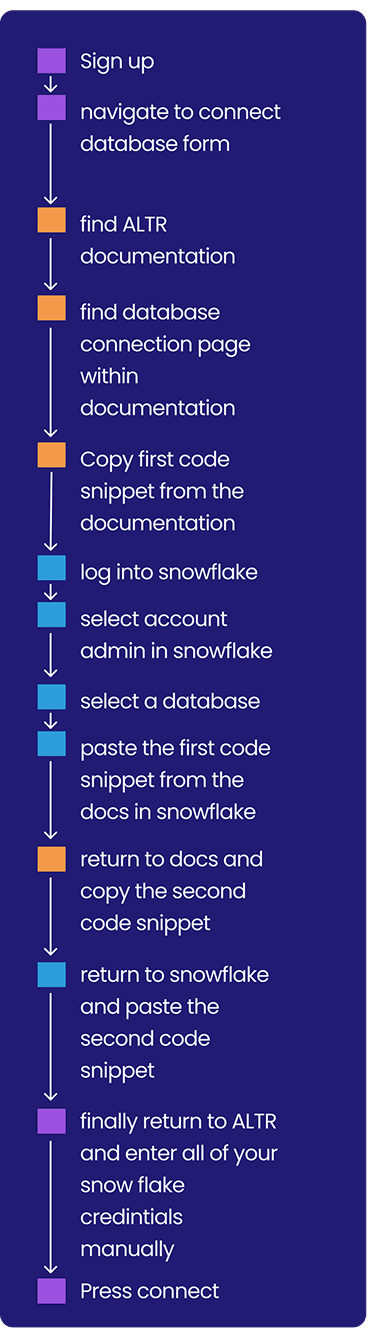
13 Steps
Across 3 Touch Points
Proposed Flow
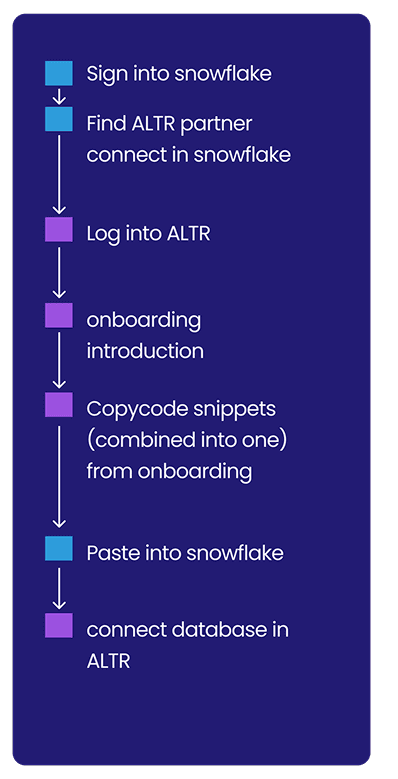
7 Steps
Across 2 Touch Points
Mapped the current activation journey end-to-end, then redesigned it to eliminate the external documentation dependency entirely.
- •Documented all 13 steps in the existing flow, tagging which product (ALTR, Snowflake, or Docs) owned each step.
- •Identified that the documentation was being used purely to copy code snippets — something the product itself could provide.
- •Proposed a new 7-step flow that keeps users within 2 products (ALTR + Snowflake) at all times.
- •Surfaced the connection process as an in-product onboarding wizard rather than a bare form.
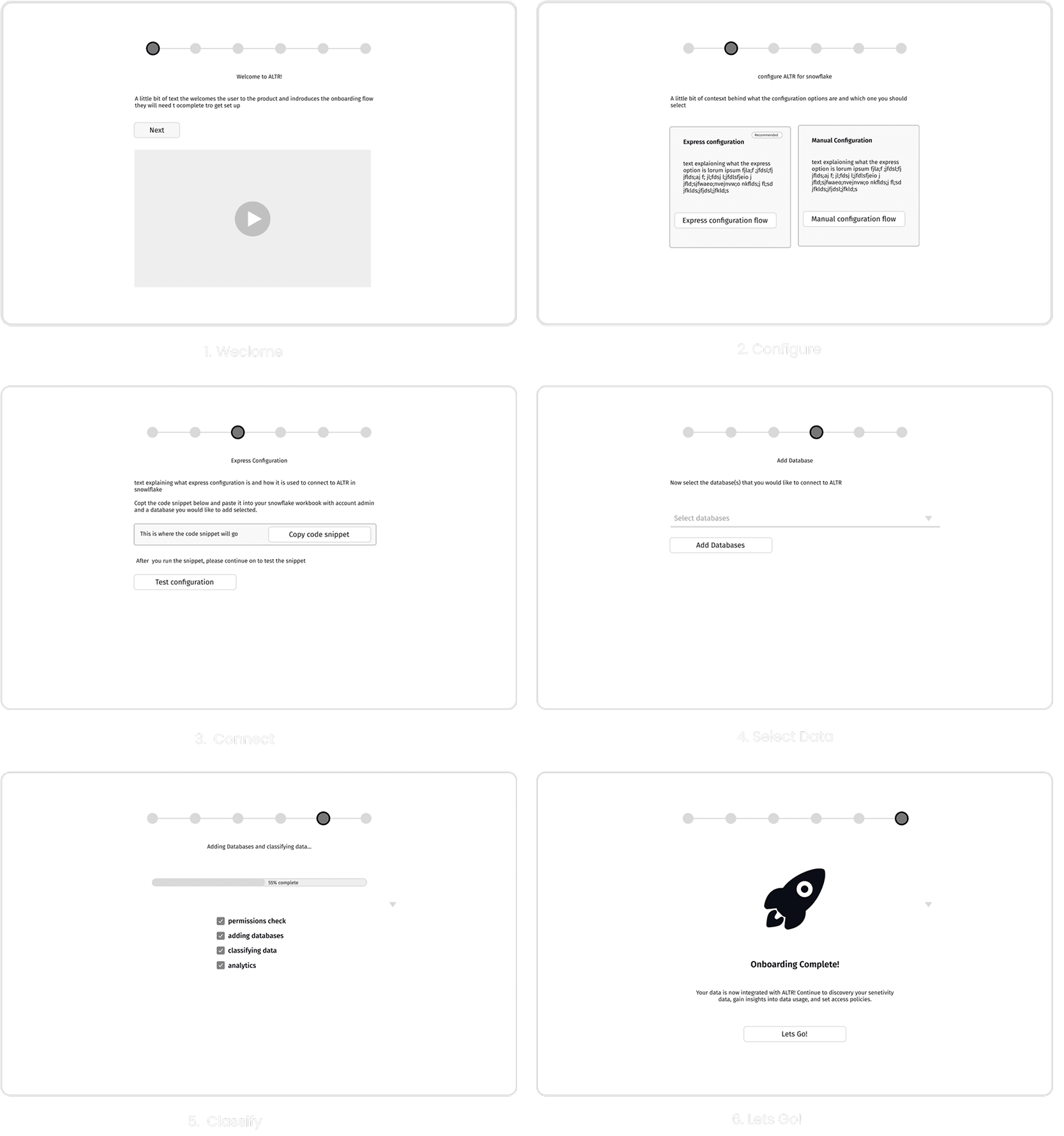
Created low-fidelity wireframes for 6 onboarding screens and validated with engineering before moving to high-fidelity hand-off.
- •Conducted feasibility sessions with engineering to align on what was possible and practical.
- •Iterated on wireframes based on engineering constraints — specifically around data fetching and form state.
- •6 screens: Welcome, Configure, Connect, Select Data, Classify, Completion.
- •Escalated to hand-off-ready deliverables after engineering sign-off.
Key Discovery
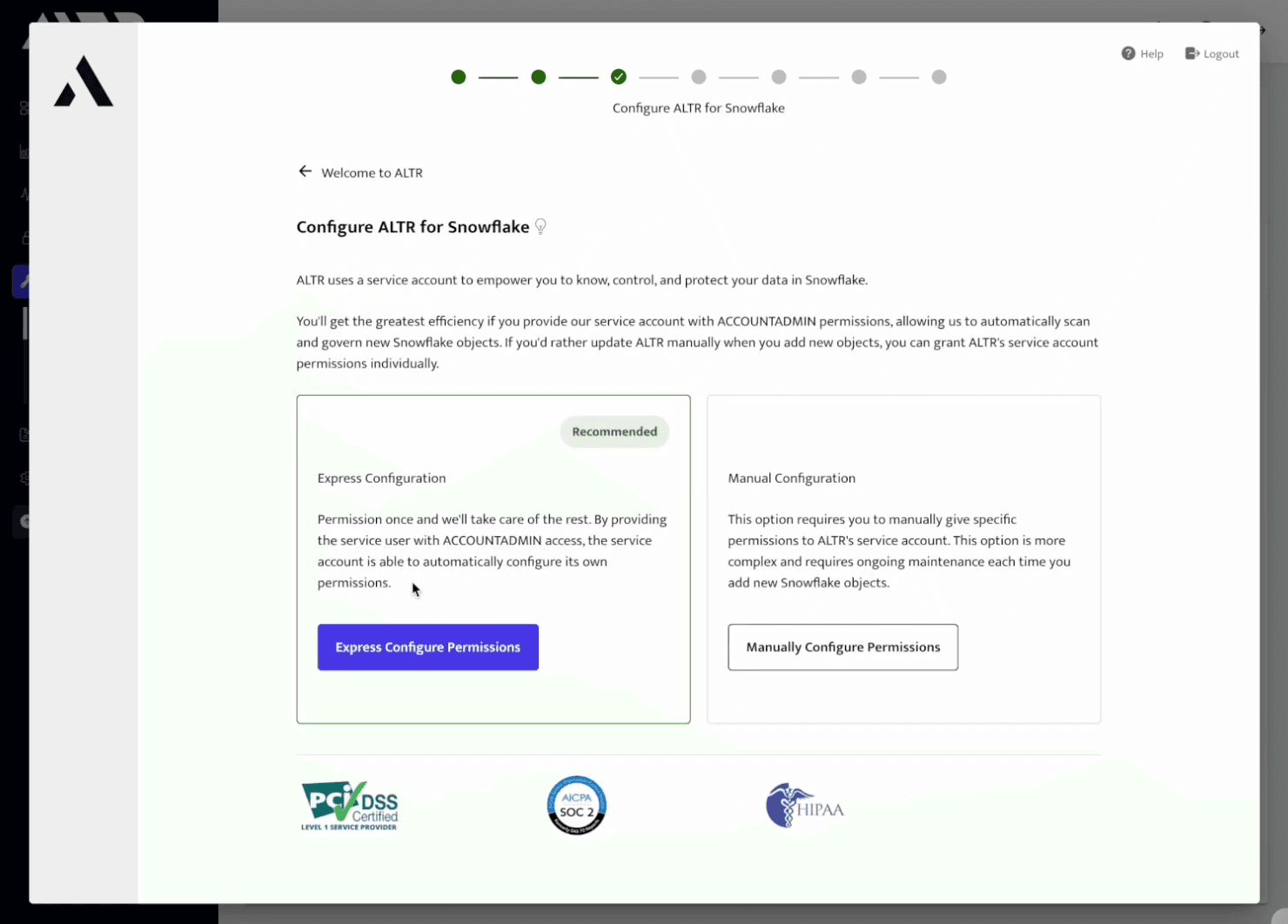
Meeting with engineering helped me understand that there were actually two different connection types: Express and Manual configuration. The Express configuration, while more limited in functionality, was much more streamlined, and prioritizing that for the first-time experience would allow users to get to value faster.
The solution wasn't tweaking the UI — it was fixing the system.
A 6-step onboarding wizard that brings all context and tools into a single, sequential flow
Rather than presenting users with a bare form and pointing them to documentation, the new onboarding experience walks them through every step of the connection process inside the product. Each screen has one clear objective, a progress indicator, and all the information needed to complete it — no tab-switching required.
01
Welcome
Product intro video, context on what ALTR does, and what users will complete in this flow.
02
Configure
Choose between Express Configuration (recommended) or Manual — with plain-language explanations of each.
03
Connect
Copy a single consolidated code snippet from inside the product and paste it into Snowflake.
04
Select Data
Choose which databases to connect via a simple dropdown — ALTR fetches available options automatically.
05
Classify
A progress bar and real-time checklist shows exactly what's happening in the background.
06
Let's Go!
Completion screen confirms activation and directs users to their next meaningful action in the product.
Simplifying High-Risk Configuration
Enterprise customers were required to grant elevated Snowflake permissions before experiencing value. This created hesitation and stalled onboarding. I introduced a clear, opinionated split between Express and Manual configuration, explicitly surfacing the tradeoff between speed and granular control. By recommending the lower-friction path while preserving transparency, we reduced decision paralysis without compromising trust. This shift helped remove a key barrier to activation.
Progress transparency and form integrity gave users the confidence to complete the process
Two small changes had an outsized impact on completion: progress indicators so users always knew how far they were from done, and form state persistence so a failed connection attempt didn't wipe out everything they'd typed. Together they addressed the two biggest drivers of abandonment identified in the usability research.
A scalable, product-led onboarding experience
7%→50%+
Activation Rate
80%
DAU Increase in 2 Months
$100K→$1M+
ARR Over Two Years
The redesigned platform transformed ALTR from an expert-dependent onboarding process into a self-serve experience that scaled naturally with the product.
By simplifying complex tokenization and policy configuration workflows, new users could successfully set up and deploy ALTR without relying on internal specialists.
This shift enabled the platform to support faster adoption, reduced onboarding friction, and positioned ALTR to scale as a true product-led enterprise security platform.
What this project taught me
This project reinforced how powerful it is to combine behavioral analytics with direct user observation. Pendo gave me the where; usability sessions gave me the why. Together, they made it possible to design a solution that felt obvious in retrospect — but would have been easy to get wrong without both.
I like to think about quantitative research as being able to position or focus a microscope or magnifying glass, and the qualitative ‘why’ as really what is discovered from looking through that focused and correctly positioned lens.
What I could've done differently
I defined activation as connecting a database — which was the right constraint for the scope of the project. But looking back, I never investigated what happened after that moment. Were users engaging with the analytics features? Were governance workflows being used as intended? Activation solved for the minimum viable entry point into the product, but it didn't answer whether users were reaching the full “aha.”

Designed & built with love in Figma + Cursor with Claude Code
© 2026 Jon Ezell. All rights reserved.